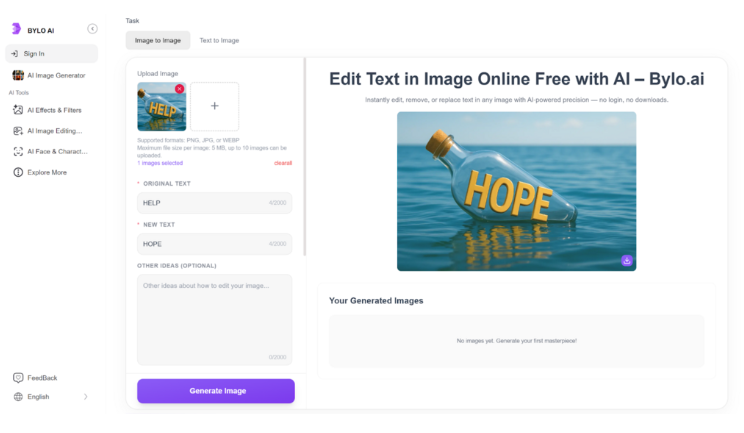
Creating visually appealing images with well-edited text is a crucial part of digital content, whether you’re managing social media, working on marketing materials, or simply editing personal photos. But for many, the process of editing text in images can be intimidating, especially without any design experience.
This is where Bylo.ai steps in. This user-friendly, AI-powered tool allows you to edit text in images effortlessly, even if you’re not a professional designer. Thanks to its advanced AI technology, Bylo.ai automatically matches the font, style, and layout, ensuring your edits blend seamlessly with the original image.
Whether you’re looking to tweak your social media posts, refresh your marketing visuals, or simply make quick edits to your photos, Bylo.ai provides a simple and effective solution. In this article, we’ll walk you through how to edit text in image with Bylo.ai, and show you why it’s the perfect tool for creating polished designs without the need for specialized skills.
Why is Edit Text in Images Perfect for Non-Designers?
AI-Powered Text Removal
Bylo.ai leverages AI technology to automatically detect and remove text from images, making the process of cleaning up visuals quick and hassle-free. Whether you’re editing old promotional material or adjusting an image for a new campaign, this AI-powered feature ensures that unwanted text disappears without a trace, leaving behind a clean canvas for your next creative step.
Smart Text Replacement
Editing text in images has never been simpler. Bylo.ai’s smart text replacement feature allows you to easily replace old text with new content while maintaining the original font, style, and positioning. The AI ensures that the new text matches seamlessly with the image’s design, so you don’t have to worry about manual adjustments or mismatched fonts.
Preserve Visual Consistency
One of the challenges when editing image text is keeping the design cohesive. Bylo.ai solves this with its ability to preserve visual consistency across all your edits. Whether you’re changing the text or replacing it entirely, Bylo.ai makes sure that the new text integrates perfectly into the image, maintaining the same layout, font style, and overall visual harmony. This guarantees professional-quality results every time.
How to Edit Text in Images with Bylo.ai: 3 Simple Steps
Upload Your Image
Begin by uploading the image that contains the text you want to edit. Whether it’s a social media post, a flyer, or a personal photo, simply drag and drop your image into Bylo.ai. The platform supports various image formats, so you can work with whatever file you have.
Describe the Text Edit
Once your image is uploaded, tell Bylo.ai exactly what you’d like to do. You can remove, fix, or replace the text in your image. Use the intuitive interface to specify your changes, and let the AI work its magic. This step only takes a few seconds, as Bylo.ai instantly detects and processes the text for editing.
Download Your Image
After the AI has made the necessary edits, preview the result and make any final adjustments if needed. Once you’re happy with the outcome, simply download your new image in high resolution. It’s fast and effortless, with no need for complicated software or design experience.
Real-Life Use Cases: How Bylo.ai Makes Text Editing in Images Effortless
Social Media Content Creation
Social media managers and marketers can benefit greatly from editing text in images for posts, ads, and banners. With Bylo.ai, you can quickly replace or adjust text on images to match new campaigns or promotions, ensuring your visuals stay fresh and relevant. Whether it’s changing the call-to-action text or updating event details, Bylo.ai ensures the new text blends seamlessly with the original design, maintaining brand consistency.
E-commerce Product Images
For e-commerce store owners, having the ability to edit text in images is essential for updating product descriptions, promotional offers, or sale information. Bylo.ai makes it easy to update text on product images without the need to create new visuals from scratch. Simply upload your image, replace outdated text with the latest details, and download your polished image in seconds—perfect for time-sensitive product launches or seasonal promotions.
Personal Event Invitations
When creating personalized invitations for weddings, parties, or other events, Bylo.ai simplifies the process of editing text in your images. You can quickly replace names, dates, or event details, all while keeping the design intact. By using AI-powered text editing, you ensure that your invitations look professional, even if you don’t have any design expertise. It’s an easy, efficient solution for creating custom invites in no time.
Educational and Informational Graphics
For educators or content creators designing informational graphics or presentations, Bylo.ai makes it easy to edit text in charts, diagrams, or other visual content. You can update captions, labels, or descriptions without losing the integrity of the original design. This allows for fast updates to educational materials, ensuring your graphics are always accurate and up-to-date.
Effortlessly Edit Text in Images with Bylo.ai
Bylo.ai simplifies the process of editing text in images, allowing anyone to create professional designs without needing advanced skills. Whether you’re updating promotional materials, refining social media posts, or customizing personal invitations, Bylo.ai offers a user-friendly, AI solution. With features like AI-powered text removal, smart text replacement, and the ability to preserve visual consistency, you can make quick edits while maintaining the integrity of your design. The edit text in image AI is fast and accessible to all, making it a great choice for both personal and professional projects.