
IRS Phishing Alert: The Sophisticated New “DocuSign” Scams Targeting Taxpayers
the staff of the Ridgewood blog
Upper Saddle River, NJ – As the 2026 tax season hits its peak, the New Jersey Cybersecurity and Communications Integration Cell (NJCCIC) is sounding the alarm on a wave of highly sophisticated phishing campaigns. Cybercriminals are currently moving beyond basic emails, now weaponizing legitimate services like DocuSign, QuickBooks, and Amazon Web Services (AWS) to steal your identity and your refund.
If you receive an “urgent” tax document today, stop before you click. Here is how these scams are evolving and what you need to look for.
🛑 The “TaxDocs” Trap: How the Scam Works
The NJCCIC has identified three primary ways hackers are currently infiltrating devices:
1. The Fake DocuSign & QuickBooks Hook
Scammers are sending emails disguised as Adobe PDF fax messages or QuickBooks notifications. They urge you to “View Document” to sign your 2025 tax forms.
-
The Payload: Clicking the link downloads XWorm malware. This is a Remote Access Trojan (RAT) that gives hackers total control over your computer, allowing them to deploy ransomware or steal your banking credentials.
-
The MFA Bypass: Some versions lead to a fake Microsoft login page designed to steal your Multi-Factor Authentication (MFA) codes and session cookies.
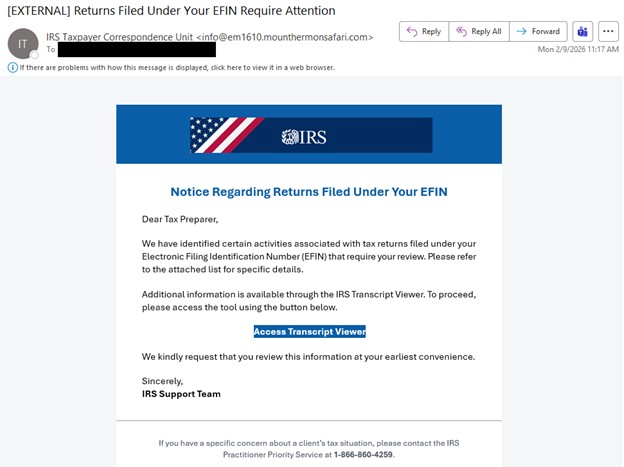
2. The “IRS Taxpayer Correspondence Unit” ruse
A separate campaign uses the official-sounding “IRS Taxpayer Correspondence Unit” to claim there is an issue with your Electronic Filing Identification Number (EFIN).
-
The Tactic: They use legitimate AWS (Amazon Web Services) links to host malicious files.
-
The Result: Executing these files installs “SimpleHelp,” a remote monitoring tool that lets criminals watch your screen and exfiltrate data in real-time.
3. High-Pressure Subject Lines
Watch out for these specific email subjects currently circulating:
-
Urgent: Action Required for 2024 Tax Year Returns
-
Critical: Immediate Review of 2024 Tax Year Filings
-
Inquiry Regarding Your 2025 Filings
🛡️ How to Protect Your Refund (and Your Identity)
The IRS does not initiate contact with taxpayers by email, text message, or social media to request personal or financial information.
-
Verify the Sender: Check the actual email address, not just the “Display Name.” Scammers often use domains like
scommunications[.]netorstateassist-irsrefundhub[.]com. -
Type, Don’t Click: Never click a link in a tax-related email. Instead, go directly to IRS.gov by typing it into your browser.
-
The “Postal” Rule: Remember, the IRS sends official notices and bills through the U.S. Postal Service.
-
Report It: If you’ve been targeted, report the incident immediately to the NJCCIC, the FBI’s IC3, and your local police.
Join the new Saddle River Valley, Ramapo and Pascack Valley Communities Facebook group
https://www.facebook.com/groups/1931704860512551/
#news #follow #media #trending #viral #newsupdate #currentaffairs #BergenCountyNews #NJBreakingNews #NJHeadlines #NJTopStories
-
Tags: #TaxScams #CyberSecurity #IRS #NJCCIC #IdentityTheft #PhishingAlert #TaxSeason2026






Expect to see articles involving Glen Rock
I set up all my online bank and investment accounts to require me to receive a text message with a code before logging on. Problem solved