NJ Cybersecurity Alert: Feds Warn of SSN Scams, Hidden Malware, and a Spiking Unemployment Fraud Wave!
the staff of the Ridgewood blog
UPPER SADDLE RIVER, NJ – The digital threat landscape in New Jersey is heating up, with new reports from the NJCCIC (New Jersey Cybersecurity and Communications Integration Cell) warning of sophisticated attacks targeting both public sector employees and citizens. From a surge in fraudulent unemployment claims to malware hidden in calendar apps and highly convincing phishing campaigns, here is what you need to know to stay safe online this week.
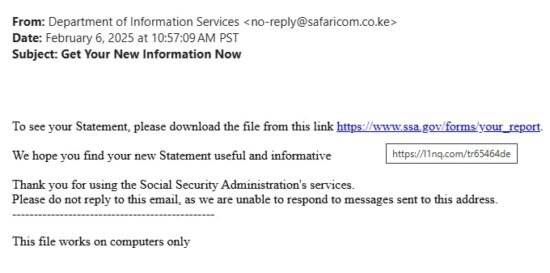
photo courtesy of Jared Caldara, Founder of ScamAware101.com
1. Unemployment Fraud is Surging—Especially for Teachers
Upper Saddle River Police are alerting the public to a dramatic uptick in fraudulent New Jersey Department of Labor (UI) claims. This campaign is primarily targeting public sector education employees who are still actively employed.
How the Fraud Happens:
Threat actors exploit Personally Identifiable Information (PII) that has been exposed in old data breaches or purchased on the dark web. They combine this PII with publicly available employee information (like names and work titles) found on official websites to successfully file and collect illegal UI benefits.
How to Know If You’re a Victim:
You might be a victim if:
- You are denied a legitimate UI application because a claim is already filed under your name.
- You receive an unexpected determination letter from the NJ Department of Labor.
- Your current or former employer notifies you of a suspicious claim.
Action Steps:
- Report Fraud: Immediately use the NJ Department of Labor’s Report Fraud online form or call 609-777-4304.
- Law Enforcement: Contact your local police department, like the Upper Saddle River Police, if you suspect your PII has been compromised.
2. Phishing Alert: The Fake Social Security Statement Scam
Cybercriminals are impersonating the Social Security Administration (SSA) in a dangerous new phishing campaign.
The Attack Breakdown:
- The Bait: Users receive an email claiming their “Social Security Statement” is available and urging them to click a link.
- The Trap: The link directs to a highly convincing webpage featuring stolen SSA branding.
- The Payload: The site instructs users to download an executable file to view instructions. This file attempts to install a remote monitoring and management (RMM) tool, giving hackers complete, unauthorized control over the victim’s system for installing malware, stealing data, or deploying ransomware.
Action Steps:
- Verify Everything: NEVER click links in unexpected emails, especially from government agencies. Government links must direct to official government websites (ending in .gov).
- Go Direct: Access all documents and statements by logging in directly to the official SSA website or app, not via an email link.
- Run Antimalware: Keep all security software, especially anti-malware programs, updated to catch malicious executables.
3. Calendaromatic Malware: The Hidden Threat in Your Desktop Calendar
Multiple New Jersey public sector organizations, including local and county government entities, have been affected by Calendaromatic malware. This threat is a Potentially Unwanted Application (PUA) disguised as a benign desktop calendar used for managing holiday schedules.
The Sophisticated Trick:
The malware is distributed via aggressive online ads that lure victims to third-party sites. The executable file is cunningly signed with a valid (though since-revoked) digital certificate.
Once installed, the malware uses a hidden Command and Control (C2) channel embedded within Unicode holiday names to receive and execute secret instructions on the host operating system. Forensic experts used Artificial Intelligence (AI) tools to trace this obfuscated code and reveal the malware’s full capabilities.
Action Steps:
- Be Suspicious: Exercise extreme caution when installing any unfamiliar or untrusted applications from web searches.
- System Cleanup: If affected, immediately reset all passwords on the host, restore systems from a clean backup, or perform a complete operating system reinstallation.
- Update PUA Detection: Ensure your antivirus/anti-malware software has PUA detection enabled and is up-to-date.
4. AiTM Phishing Attacks Target Email Quarantine Notifications
A cutting-edge phishing campaign is now posing as automated quarantine email notifications—a service used by many businesses to hold risky messages.
The Attack Breakdown (AiTM):
- The Lure: An email prompts the user to review quarantined messages by clicking a link.
- Bypassing Security: The link first leads to a CAPTCHA verification page, which clever hackers use to bypass email security systems.
- Credential Theft: After verification, the user is redirected to a highly realistic, but fake, Microsoft login page. Any credentials entered here are harvested via a technique called an Adversary-in-the-Middle (AiTM) attack, and session cookies are also stolen.
- Final Takeover: The victim then receives an MFA approval request via the Microsoft Authenticator. Approving this request grants the threat actor full access to the account.
Action Steps:
- Double-Check URLs: Always check the URL before entering credentials; if it’s not an official Microsoft domain, it’s a scam.
- Verify Requests: Confirm any unexpected requests for authentication or account changes through an official, verified source (like a company phone number).
- Change Passwords: If you suspect compromise, change your password immediately and reinforce your account security.
Tell your story #TheRidgewoodblog , #Indpendentnews, #information, #advertise, #guestpost, #affiliatemarketing,#NorthJersey, #NJ , #News, #localnews, #bergencounty, #sponsoredpost, #SponsoredContent, #contentplacement , #linkplacement, Email: [email protected]